
Creavi Help Center
Frequently asked questions
Find quick answers about displaying your booking calendar, creating services, working with multiple employees, calendar synchronization, reminders, and availability.

Getting started
Edit the page where you want the calendar, add a Shortcode block or widget, and paste [creavibc_booking_inline id="123"]. Replace 123 with your service ID, then publish or update the page.
Add a Shortcode block or widget and paste [creavibc_booking_button id="123"]. Replace 123 with the correct service ID. Clicking the button opens that service’s booking flow in a popup.
Go to Creavi → Services. The service list includes a Shortcode column. You can also edit a saved service and copy its generated shortcode from the shortcode box.
Publishing activates the service for booking but does not create a standalone public page. Create or edit a normal WordPress page and add the service with a Creavi block or shortcode.
Yes. Use the included Creavi Gutenberg blocks, or paste a Creavi shortcode into Elementor’s Shortcode widget or the equivalent shortcode element in another page builder.
Yes. Add multiple inline calendars, popup buttons, or booking blocks to one page. Each widget can use a different service ID.
Creavi does not impose a service limit. Create as many services as your business needs, each with independent availability, forms, notifications, meeting settings, and calendar connections.
Confirm that the service and page are published, the shortcode contains the correct service ID, and availability is configured. Then clear your WordPress, hosting, CDN, and browser caches.
You can configure a service with a 20, 30, or 60-minute appointment duration. Available start times are recalculated from the selected duration, availability, bookings, and optional buffer.
Yes. Both the inline calendar and popup booking flow are responsive and designed to work on phones, tablets, and desktop browsers.
Services and team
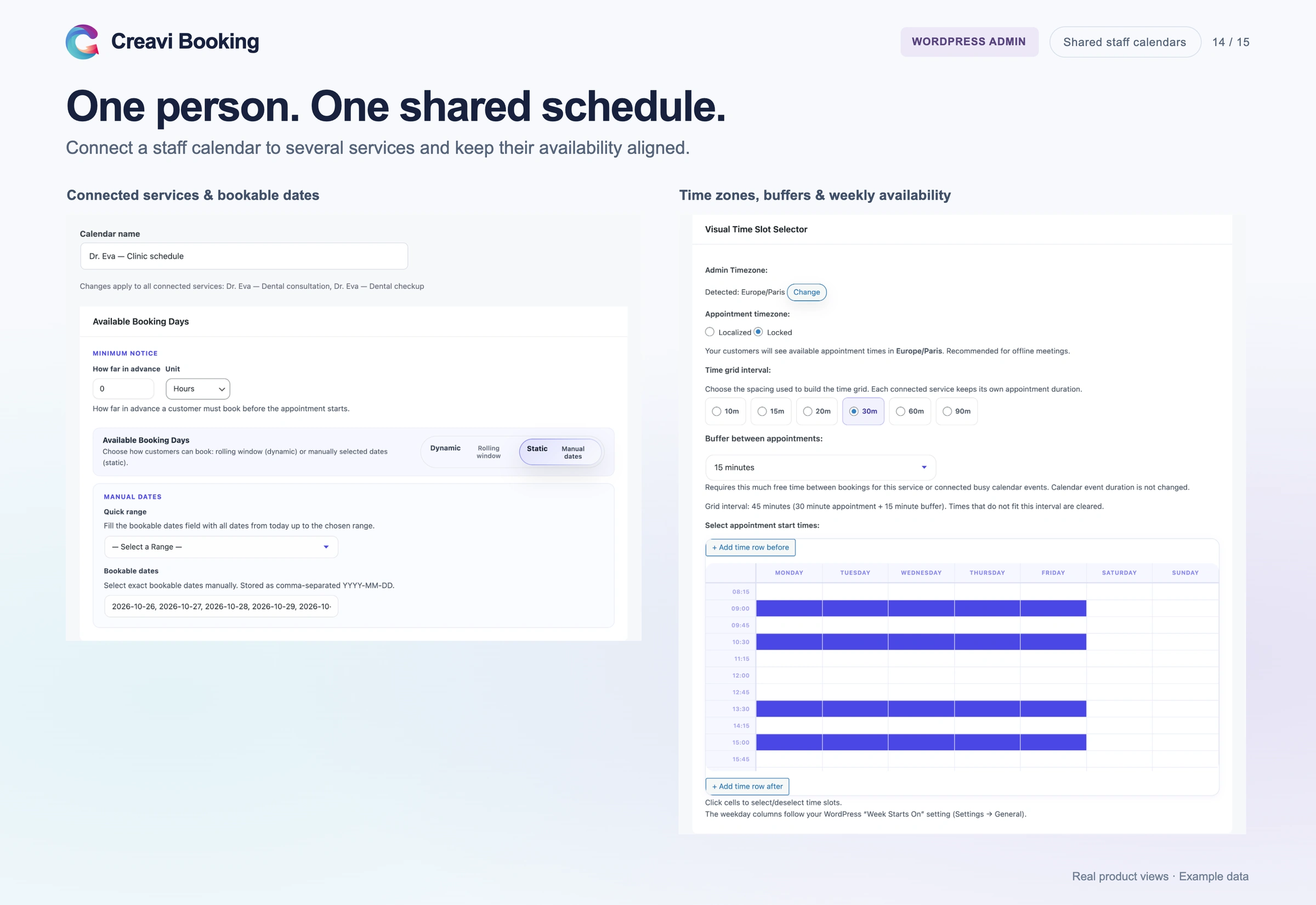
Yes. Add each employee in Creavi → Staff Members and create a staff calendar for them. Create a published service for each employee and service combination, then select that employee’s staff calendar under Available Booking Days for every service they offer. A booking in one connected service blocks overlapping times in the others. See the staff booking and Service Catalog guide for the full setup.
Yes. Enter the responsible employee’s address in the service’s Admin Notification Email field. That address receives notifications, reminders, and calendar invitations for the service.
Yes. Google and Outlook connections are configured per service, so services for different employees can use different external calendars to block busy times. If one employee offers several services, connect those services to the same staff calendar under Available Booking Days so a local booking in one service blocks overlapping times in the others.
Create a published service for each employee and service combination. Add the Service Catalog to a page so visitors can browse those services together, or display individual services with an inline calendar, popup button, Service Hero block, or Booking Profile block. See the staff booking and Service Catalog guide for the setup steps.
Yes. Set each employee’s working hours in their staff calendar and select it as the Available Booking Days source for the services they offer. Each service can still have its own appointment duration, booking fields, meeting settings, emails, and reminders. Connecting one employee’s services to the same staff calendar keeps their availability aligned and prevents overlapping local bookings.
Services can offer in-person appointments, phone calls, custom online meeting links, or secure video meetings generated by Creavi.
Scheduling and integrations
Set an optional 5–60 minute buffer per service. Creavi applies it after appointments when checking local bookings and connected Google or Outlook events.
Yes. Customer and admin templates are configured per service and support placeholders such as {name}, {service}, 30 July 2026, {time}, {location}, and meeting or calendar links.
Reminders depend on WordPress Cron and WordPress email delivery. Check reminder settings, recipient addresses, spam folders, and SMTP. For reliable timing, configure your server to call wp-cron.php regularly.
Yes. Creavi can create events for new bookings and remove busy Google or Outlook times from the service’s available frontend time slots.
Creavi removes times that conflict with existing local bookings. Services linked to the same staff calendar also block overlapping times across those services. When Google or Outlook busy-time synchronization is enabled for a service, external events can block unavailable times too. Creavi checks for conflicts again when the customer submits the booking.
Choose localized mode to display times in the visitor’s time zone, or locked mode to keep the business time zone for everyone. The selected time zone is shown in the booking flow.