


Creavi delivers a polished WordPress booking experience with a service catalog, shared staff calendars, free Google and Outlook connections, and built-in video meetings. LatePoint currently offers checkout during booking, while payments and deposits are planned for future Creavi releases.
Both plugins have a free version. The important difference is which features each includes before you pay.
This comparison explains those differences so you can choose around your actual booking process.
Creavi is our plugin.
Creavi vs LatePoint at a glance
| Feature | Creavi | LatePoint Free | LatePoint Pro |
|---|---|---|---|
| Appointment booking | Included | Included | Included |
| Google and Outlook Calendar connections | Included free | Requires Pro | Included |
| Automatic video meeting links | Built-in video meetings | Requires Pro | Meeting-provider integrations |
| Scheduled email reminders | Included free | Requires Pro | Included |
| Custom booking fields | Included free | Requires Pro | Included |
| Payments during booking | Planned for future releases | Stripe and Razorpay | Additional payment options |
| Staff and provider scheduling | Shared staff calendars and provider choice included | Requires Pro | Included |
| Group booking capacity | Planned for future releases | Requires Pro | Included |
Feature availability follows the current Creavi plugin documentation and LatePoint’s published feature and pricing information. External services may have their own requirements or charges.
What do you get for free?
Creavi
Creavi includes Google and Outlook Calendar connections without a paid upgrade. New bookings can create calendar events, while existing busy events prevent conflicting appointment times from appearing as available.
Email reminders and built-in video meetings are also included. Payments and deposits are listed on Creavi’s public roadmap for future releases.
There is no plugin-imposed limit on the number of services or bookings. Practical capacity still depends on your WordPress hosting.
Each service can have its own availability and booking form. For example, you could offer a short introductory call alongside a longer consultation, with different schedules for each.
LatePoint Free
LatePoint Free includes unlimited appointments and accepts payments through Stripe or Razorpay. It also provides email notifications and a customer dashboard.
That makes it a useful option for businesses whose main requirement is collecting payment when someone books. Calendar integrations and scheduled reminders belong to the Pro feature set.
Calendar connections: what does synchronization mean?
A calendar connection should do more than give customers an “Add to calendar” link.
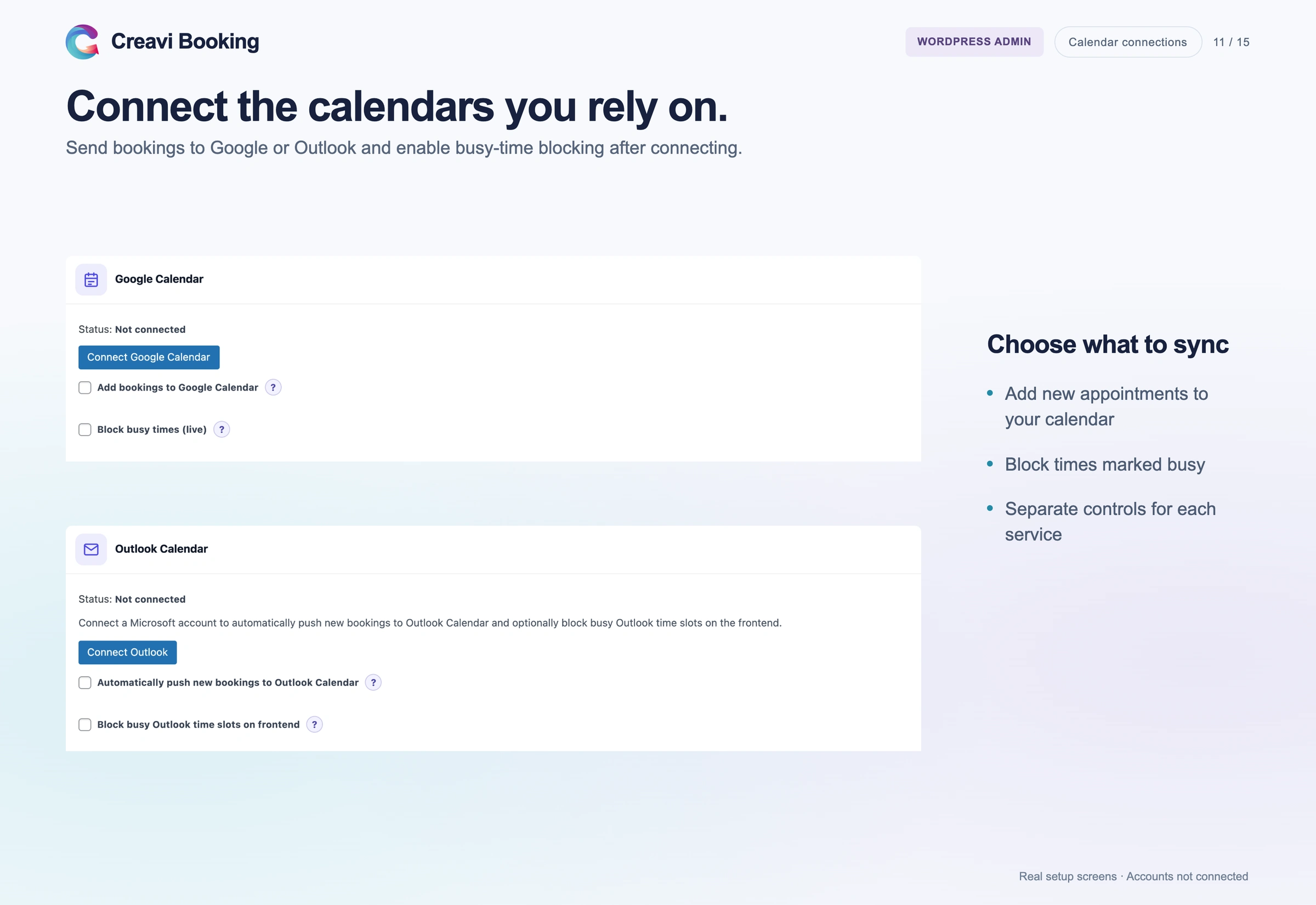
With Creavi, connecting Google or Outlook allows the plugin to create an event for a new appointment. It also checks busy periods in the connected calendar when determining available times.
For example, if you block an afternoon for another commitment, customers should not be offered overlapping appointments. Creavi also supports booking buffers when you need time between sessions.
Our Google Calendar booking guide explains this workflow.
LatePoint also supports calendar synchronization. Its Google Calendar documentation describes selecting calendars for incoming and outgoing events, with an auto-sync option. This is a configured integration, not simply an exported calendar file.
Whichever plugin you choose, test a booking and a blocked calendar event before accepting customers.
Video appointments: built-in meetings or your existing platform?
Creavi can automatically generate video meeting links for online appointments. The customer receives the participant link, while the administrator receives the host link.
Those links can appear in confirmation messages and reminders. You do not need to create a separate meeting manually for every booking.
This is useful for an independent coach who wants a client to book a session and receive the joining details automatically. Our guide to booking with built-in video conferencing explains the customer journey.
LatePoint takes an integration-based approach. For example, its Zoom integration connects a Zoom account and can create a meeting for an approved appointment. The setup includes assigning a Zoom user to an agent and enabling meeting creation for the service.
LatePoint also documents Microsoft Teams meeting creation through its Outlook connection.
The choice is therefore not whether video appointments are possible. It is whether you prefer Creavi’s built-in meeting option or an integration with a platform your business already uses.
Booking forms and reminders
Creavi lets you adjust the default customer fields, including the phone number field. You can add custom questions when a service needs more information.
For an introductory consultation, a short question such as “What would you like to discuss?” may be enough. Keep the form focused on information you need before the appointment.
Creavi also provides separate reminder settings for customers and administrators. Each can receive different content at a different time.
LatePoint’s reminder system uses workflows with time offsets around an appointment. Administrators can inspect scheduled jobs to check whether those actions ran. This offers more workflow control when that is part of your requirement.
For either plugin, check actual email delivery during setup. A configured reminder is only useful if it reaches the recipient.
How much does LatePoint Pro cost?
At the time of review, LatePoint advertised its one-site Starter plan at US$79 for the first year, with US$99 shown as the regular annual price.
Its pricing page also offered a one-site lifetime option at US$199, reduced from US$249.
All paid plans include the same feature set. The main difference between the plans is the number of websites covered. Introductory offers can change, and renewal pricing should be checked at checkout.
Creavi has no plugin licence fee for the features described in this article. WordPress hosting remains a separate cost with either choice.
Is Creavi a good free LatePoint alternative?
Yes, when your priority is one-to-one appointment booking with connected calendars and video meetings.
Consider a consultant who invoices clients separately. The website needs to show available times, collect a few details and send the meeting link. Creavi can cover that process without adding a booking-plugin subscription.
The decision changes if customers must pay to reserve an appointment. LatePoint is then worth evaluating, including its free edition.
For businesses that need employees to manage their own schedules, or need several customers to book the same session, LatePoint Pro deserves a closer look.
Choose around the requirements you have now. A feature you never use does not improve your booking process.
Questions before switching
Can I move existing LatePoint bookings into Creavi?
Do not assume the plugins’ import and export formats are interchangeable. Keep a backup and check how existing appointments will be preserved before replacing your booking form.
Does Creavi work with Elementor?
Yes. You can insert a Creavi shortcode using Elementor’s Shortcode widget. Choose an inline calendar or a button that opens the booking form. See our Elementor booking guide.
Which plugin should I test first?
Choose Creavi for a polished booking solution with free calendar connections, shared staff availability and built-in video appointments. If checkout during booking is required today, compare LatePoint’s current payment flow with Creavi’s published roadmap.
Before launching, complete a test appointment on a phone. Check the confirmation email and verify that the calendar connection behaves as expected.
Download Creavi free from WordPress.org to try it on your website. If you would like help with setup, book a call with Julia.




1 Comment
[…] reading: 6 Best WordPress Booking Plugins in 2026 · Creavi vs Amelia · Creavi vs Bookly · Creavi vs LatePoint · Free WordPress Booking Plugin with Google Calendar Sync · Outlook Calendar Integration · […]