



WordPress booking plugins for salons need to handle more than an open appointment slot. Clients may need to choose a treatment and a stylist, while the salon needs enough time for the service, cleanup and the next client. Some businesses also need processing breaks, deposits or online payment.
The best choice depends on that workflow. Creavi gives salons a polished booking experience with a service catalog, provider choice, shared staff availability and free calendar connections. Salon Booking System has features designed specifically for salon treatments. LatePoint and Amelia offer online payment options in their free versions, while Bookly offers a broad range of paid extensions.
Creavi develops one of the plugins in this comparison.
WordPress salon booking plugins at a glance
| Plugin | Consider it when… | Check before choosing |
|---|---|---|
| Creavi Appointment Booking Calendar | Clients can browse treatments, choose a provider and book against shared staff availability. Google and Outlook Calendar connections are included. | Online payments and deposits are planned for future releases on the Creavi roadmap. |
| Salon Booking System | You need salon-specific scheduling, including service breaks for processing time. Its free version lists unlimited staff, services and bookings. | Online payments and deposits require Pro. |
| LatePoint | A solo provider wants to accept Stripe, PayPal or Razorpay payments through the free plugin. | Multiple staff, service extras and Google Calendar sync are listed as Pro features. |
| Amelia | Square payment in a free booking plugin is a priority. | Employee management, custom service durations and other advanced features are listed under premium features. |
| Bookly | You want a booking system that can expand through Pro and add-ons. | Online payments, unlimited staff and services, and add-ons are unavailable in the free version. |
What should a salon test first?
Write down three real appointments before comparing feature lists. For example: a short consultation, a treatment offered by two stylists, and a service that needs a processing break. Then ask:
- Can clients choose the right person? If two stylists offer the same treatment, check how each plugin presents them and keeps their calendars separate.
- Does the duration match the treatment? Test your actual appointment lengths, including preparation or cleanup time.
- What happens during a processing break? A colour treatment may need a different scheduling pattern from a continuous one-to-one appointment.
- When does the client pay? Decide whether payment at the salon is enough or whether you need full payment or a deposit online.
- What prevents overlapping bookings? Test a stylist who offers several services and also has events in an external calendar.
These questions reveal plan limits faster than a long feature checklist.
1. Creavi: service and provider choice without booking limits
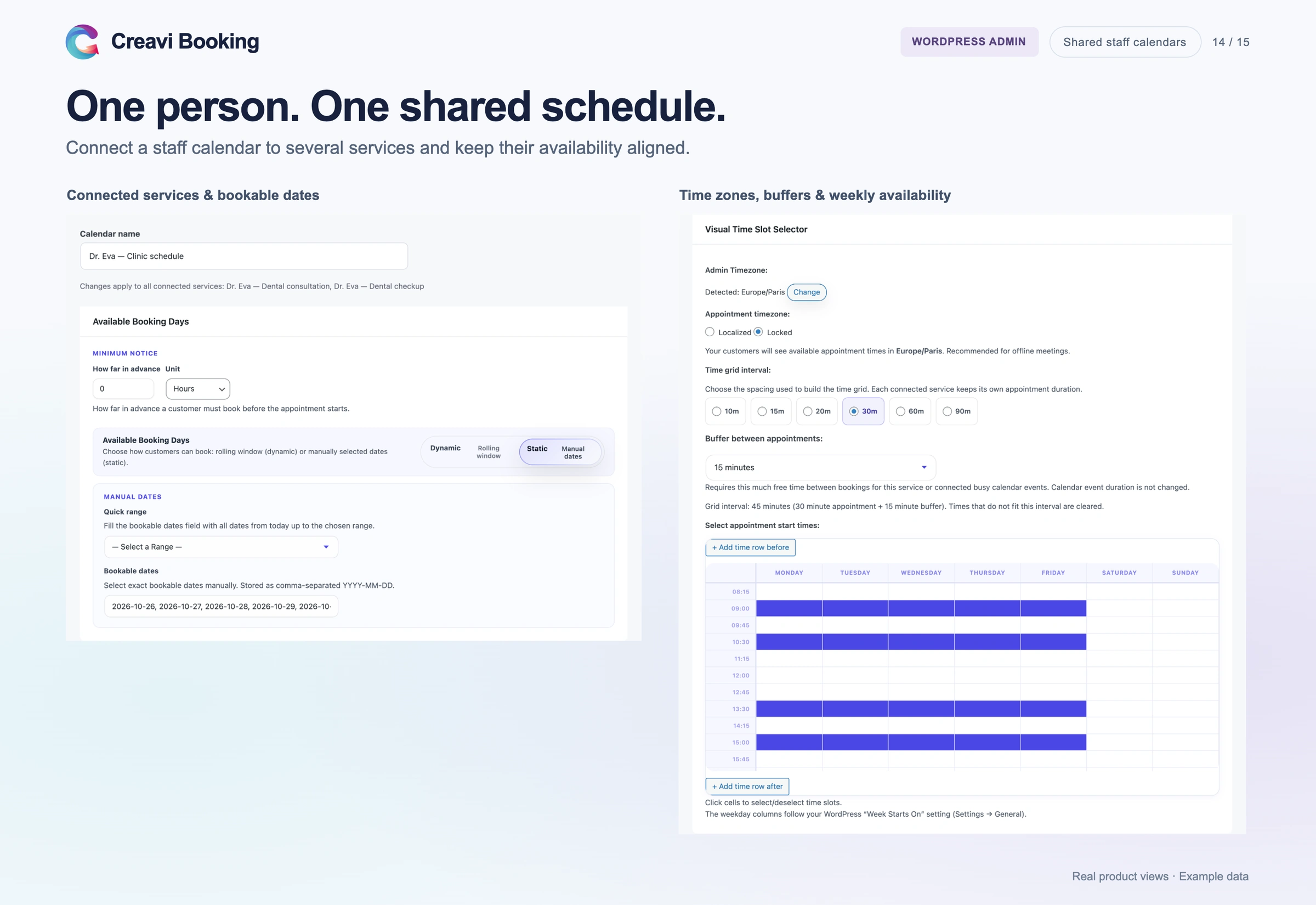
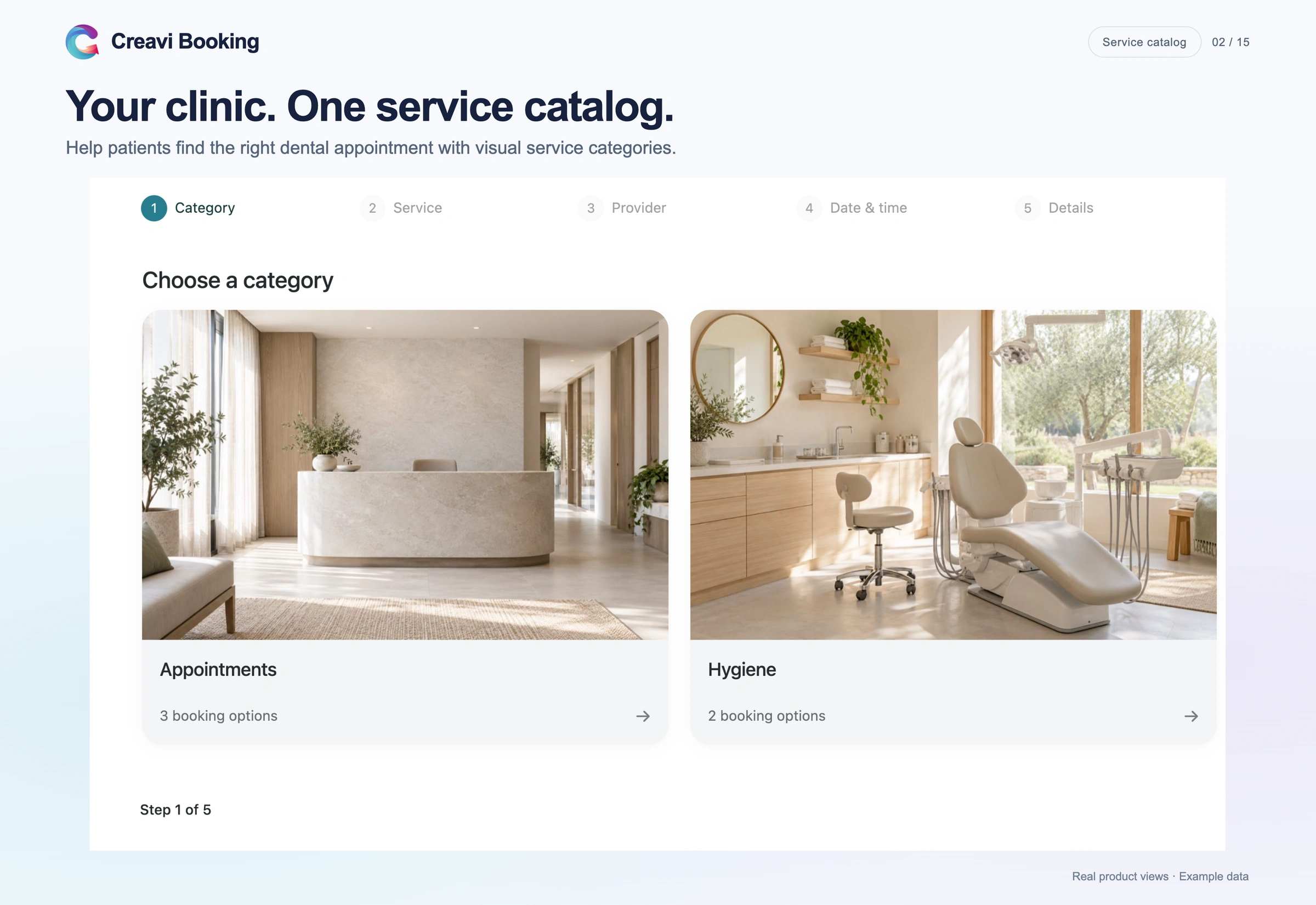
Creavi lets a salon build a service catalog as a simple list or as category cards. In a category catalog, a client can choose a treatment, compare providers and select an available time. Services assigned to the same staff calendar share availability, so a booking for one treatment blocks an overlapping time for that person’s other treatments.
The free plugin includes Google and Outlook Calendar connections, email confirmations and reminders, booking buffers, and no plugin-imposed limit on services or bookings. Salons can publish their treatment menu and let clients book directly from it.
Set each service’s appointment duration and booking buffer to fit your schedule. Online payments and deposits are planned for future releases. For the setup steps, see our service catalog and staff booking guide.
2. Salon Booking System: scheduling built around salon treatments
Salon Booking System is worth testing when your appointment schedule has salon-specific rules. Its listing describes individual staff timetables, services assigned to staff, secondary services and breaks for processing time. The free version includes unlimited staff, services and bookings, plus Google Calendar sync.
This may suit a salon where a client books a cut alongside another treatment, or where a stylist’s time needs to be managed around processing. Online payments and deposits are Pro features, so include that cost when comparing it with a free payment option.
3. LatePoint: online payment for a solo provider
LatePoint lists Stripe, PayPal and Razorpay payments in its free plugin. That makes it a candidate for an independent stylist or beauty professional who wants clients to pay when they book.
A growing salon should examine the paid plan before deciding. LatePoint lists multiple staff, service categories, extras, custom service durations and Google Calendar sync as Pro features. If you need several stylists and connected calendars, compare the full setup and cost.
4. Amelia: Square payments in the free version
Amelia Lite lists online payments through Square. Its premium feature list includes managing multiple employees, custom service durations and additional payment integrations.
Amelia is worth a closer look if Square is already part of your business. If your salon needs several employees, different treatment lengths or deposits, check which paid plan provides the complete workflow you need.
5. Bookly: a booking system with paid extensions
Bookly lets clients choose a category, service, employee and available time. Its WordPress listing is clear about the free version’s boundaries: online payments, unlimited staff and services, and the ability to install add-ons require Bookly Pro.
Bookly may suit a salon prepared to build its workflow through Pro and selected extensions. Before buying, list every feature you need and price the whole setup, rather than comparing only the base plugin.
Which plugin fits your salon?
For a salon focused on service choice and team availability: Start by testing Creavi and Salon Booking System. Creavi provides a treatment catalog, provider choice, shared staff calendars and free Google/Outlook connections. Salon Booking System offers specialized treatment scheduling, including processing breaks.
For an independent provider who needs online payment: Test LatePoint’s free payment flow and Amelia Lite’s Square integration using a real transaction in test mode.
For a team that needs deposits, extras or complex treatment rules: Compare the relevant paid plans. Confirm that each plan covers your staff count, service durations, payment method and calendar connections.
A plugin that handles your busiest day accurately is more valuable than one with the longest feature list. Create a test booking for each stylist, book two different services with the same person, and check that the second service no longer offers an overlapping time. Then try the complete client journey on a phone.
Frequently asked questions
Can I run salon bookings from my WordPress website?
Yes. Each plugin in this guide provides a booking flow for a WordPress site. The differences are how they handle staff, treatment rules, payments and paid-plan limits.
Do I need to take deposits online?
Only if that matches your business policy. If clients pay at the salon, start with the booking and availability workflow. If a deposit is essential, confirm that your chosen plan supports it before setting up the rest of the site.
Can clients choose a stylist in Creavi?
Yes. A category-based Creavi service catalog can show multiple providers for a treatment. Each provider option links to a bookable service, and services for the same person can share a staff calendar.
Try the booking journey yourself
If your salon needs treatment categories, provider choice and shared availability, explore the Creavi booking demo and the service catalog setup guide. For businesses comparing booking systems across several industries, see our broader WordPress booking plugin comparison.