
The best WordPress booking plugins for personal trainers let clients book a free assessment, choose a session type and a trainer, and see only times that fit your schedule, including travel between gyms. Creavi Appointment Booking Calendar does this in its free plugin, with Google and Outlook sync, buffers and video sessions for online coaching. Amelia, Bookly, LatePoint and Booknetic add online payments, packages or group classes, mostly in paid plans or add-ons.
Last updated: 18 November 2026. Product check: Creavi 1.8.0 and competitor listings and pricing pages, verified 18 November 2026. Creavi develops one of the plugins in this comparison.
Booking plugins for personal trainers at a glance
| Plugin | Consider it when… | Check before choosing |
|---|---|---|
| Creavi | Clients book assessments and one-to-one sessions in person or by video, with trainer choice and Google or Outlook sync in a free plugin | Online payments, group classes and recurring sessions are planned for upcoming releases |
| LatePoint | A solo trainer wants to take Stripe, PayPal or Razorpay payments or deposits with a free plugin | Multiple trainers, packages, group bookings, recurring sessions and calendar sync are Pro features |
| Amelia | You want session packages, recurring appointments and group booking in one paid plan | The free version takes Square payments. Packages, recurring appointments and multiple employees are premium |
| Bookly | You want a system you extend through Pro and add-ons | The free version allows up to five services. Group and recurring bookings are paid add-ons that require Pro |
| Booknetic | Group sessions and recurring appointments are a priority | Stripe and PayPal start with Standard, Outlook and video with Premium, and packages are in Elite |
What should a personal trainer test first?
A trainer’s booking page has a different job from a salon’s or a consultant’s. Sessions happen in different places, clients often book weekly, and the first meeting is usually a free assessment. Test each plugin against your real week.
- The first session. Can a new client book a short free assessment that is separate from paid sessions?
- Session types. Can in-person and online sessions have different lengths, locations and reminder emails?
- Travel and reset time. Can you add a gap after each session to travel between gyms or set up equipment?
- Your real calendar. Do personal appointments in Google or Outlook block times on your website?
- Choosing a trainer. In a studio, can clients pick a trainer or compare several trainers’ times?
- No-shows. Are reminders automatic, and can you set when they go out?
- Payment. Should clients pay when they book, or do you already sell memberships and packages elsewhere?
- Classes. If you run small-group sessions, does the plugin handle capacity and repeating bookings?
1. Creavi: assessments, one-to-one sessions and trainer choice in the free plugin
Creavi is the plugin we develop. We designed it around services, so every session type you offer gets its own settings while your availability stays protected across all of them.
One service per session type. A free assessment, a 60-minute studio session and a 30-minute online check-in can each have their own duration, availability, booking form, location and emails. Sessions can run 10, 15, 20, 30, 60 or 90 minutes, and you can set weekday hours, days off, minimum notice and a rolling booking window.
In person or online. Each service sets its meeting method: a gym or studio address, a phone call, your own meeting link or a secure video meeting generated by Creavi. Online clients in other countries can see times in their own timezone. Read more about booking with built-in video meetings.
Buffers for travel and setup. Optional buffers from 5 to 60 minutes keep a gap after each session. Creavi checks them against existing bookings and connected calendars, which our guide to preventing double bookings explains in detail.
One trainer, several services, no overlaps. Connect a trainer’s services to the same staff calendar. A booking in any of them then blocks the overlapping time in the others, so an in-person session at 9:00 removes the online check-in at 9:30.
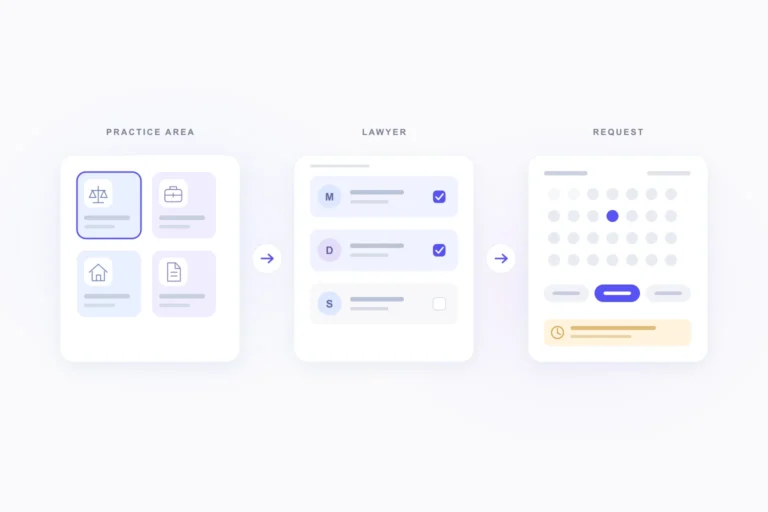
Several trainers on one page. The Service Catalog groups sessions into categories with images. Clients choose a category such as Strength or Mobility, then a session, then one or more trainers, and compare their available times.
Your calendar stays in charge. Google Calendar and Outlook connections are included free and set per service. They create an event for each booking and block times that are already busy. See our Google Calendar sync guide for setup.
Fewer missed sessions. Customer and trainer reminders have separate schedules and templates, and confirmation emails can include a calendar file. Since version 1.8.0, you can also hold a booking for approval per service, for example to check that a new client is a good fit before the assessment. You can reschedule or cancel upcoming appointments from WordPress, with optional customer notifications.
On your own site. The booking calendar appears inline or behind a button, through shortcodes, the Booking Profile and Service Hero blocks, Elementor or another page builder.
A WordPress.org reviewer wrote that Creavi was simple to set up, that clients could book without back-and-forth messages, and that the Google Calendar connection helped avoid double bookings.
What’s coming next. Online payments and deposits, starting with Stripe, are planned for upcoming releases, together with group sessions, recurring appointments and self-service links that let clients cancel or reschedule. Follow progress on our plugin roadmap. If you sell session packages, tell us how they should work in your booking flow.
2. LatePoint: free payments for a solo trainer
LatePoint’s free plugin accepts Stripe, PayPal and Razorpay payments, with a fixed deposit per service, and clients can cancel from a customer dashboard. That suits an independent trainer who wants clients to pay at booking.
Its listing places multiple staff, service packages, group bookings, recurring appointments and rescheduling in Pro. Two-way sync with Google, Outlook and Apple Calendar is also Pro, as are the Zoom and Google Meet integrations. Our Creavi and LatePoint comparison goes deeper.
3. Amelia: packages and recurring sessions in paid plans
Amelia’s free Lite version on WordPress.org accepts online payments through Square. Its listing names packages of services, recurring appointments and group booking as premium features, together with managing multiple employees and custom booking-form fields. Google Calendar, Outlook Calendar, Zoom and Google Meet integrations are premium too.
A studio that sells session bundles and wants them inside the booking system should compare Amelia’s paid plans against the full list of features it needs. See our Creavi and Amelia comparison.
4. Bookly: a modular system built through Pro and add-ons
Bookly’s WordPress.org listing says the free version allows up to five services. Online payments and unlimited staff and services require Bookly Pro, and Google Calendar and Zoom are listed as Pro features.
For trainers, group booking, recurring appointments and custom fields are paid add-ons that require Pro. Price the whole setup before you decide. Our Creavi and Bookly comparison covers the details.
5. Booknetic: group and recurring sessions in every plan
Booknetic is sold in Basic, Standard, Premium and Elite plans, and its pricing page mentions a free version to test first. Group appointments with capacity, recurring appointments and deposits are listed in every paid plan.
Stripe and PayPal payments, Google Calendar sync and the customer panel start with Standard. Outlook, Zoom, Google Meet and Microsoft Teams start with Premium, and packages are listed only in Elite. See our Creavi and Booknetic comparison.
Example: a studio with two trainers
This example is invented to show the setup in Creavi.
A studio has two trainers. Ana runs strength sessions in the studio and online check-ins by video. Leo runs mobility sessions in the studio.
- Free assessment, 30 minutes: two booking options, Ana and Leo, held for approval so the studio can confirm each new client.
- Strength session, 60 minutes: Ana, at the studio address.
- Online check-in, 30 minutes: Ana, as a Creavi video meeting, shown in each client’s own timezone.
- Mobility session, 60 minutes: Leo, at the studio address.
Ana’s three services share her staff calendar, which adds a 15-minute buffer to reset equipment. When a client books her 9:00 strength session, her online check-ins from 8:30 to 10:00 disappear. The 15-minute buffer has to fit between appointments, so her first free check-ins that morning are 8:00 and 10:30. Leo’s times do not change.
Keep health details out of the booking form
Many trainers ask about injuries and medical history before a first session. A booking form is not the best place for those answers.
- Ask for the minimum. Collect name, contact details and training goals. Handle health screening at the assessment or through a secure questionnaire.
- Review calendar events. In Creavi, the default Google Calendar event description includes submitted custom booking fields, and the same template is used for calendar files. Edit it if those answers should not sit in your calendar.
- Review emails. The
{custom}tag inserts submitted answers into emails and reminders. Use it only where those answers are safe to send. - Add consent and a retention period. Link the consent checkbox to your privacy policy, and set how long old booking records are kept.
In the EU, health information is a special category of personal data under the GDPR. This guide covers booking software, not legal advice, so check the rules that apply to you.
Which plugin fits your training business?
- One-to-one sessions in person and online, with payment handled through memberships or invoices: Creavi gives you assessments, buffers, trainer choice, Google and Outlook sync and video meetings without a paid plan.
- A solo trainer who wants payment at booking for free: LatePoint’s free plugin takes payments and deposits.
- A studio that needs packages, classes and payments in one system: compare Amelia, Bookly Pro with add-ons, LatePoint Pro and Booknetic, and price every plan you need.
Frequently asked questions
Is there a free WordPress booking plugin for personal trainers?
Yes. Creavi’s free plugin on WordPress.org includes assessments and one-to-one sessions, buffers, Google and Outlook sync, video meetings, reminders and trainer choice through the Service Catalog. It sets no plugin-imposed limits on services or bookings.
Can clients book online training sessions by video?
Yes. Set a service’s meeting method to a secure video meeting generated by Creavi, or use your own meeting link. Clients can see times in their own timezone.
Can I add travel time between clients?
Yes. Add a buffer of 5 to 60 minutes after each session. Creavi keeps that time free across existing bookings and connected Google or Outlook calendars.
Can several trainers share one booking page?
Yes. A Service Catalog lets clients choose a session category, then one or more trainers, and compare their available times. Each trainer’s services can share one staff calendar to prevent overlaps.
Can clients pay for sessions or packages when they book?
Not in Creavi yet. Online payments and deposits are planned for upcoming releases. LatePoint takes payments in its free plugin, and Amelia, Bookly and Booknetic take payments in their free or paid versions.
Can I run group classes or recurring sessions?
Group sessions and recurring appointments are planned for upcoming Creavi releases. Today, Booknetic lists both in every paid plan, Amelia and LatePoint include them in paid versions, and Bookly offers them as add-ons that require Pro.
Try the booking journey yourself
The quickest test is to book a session on your own site. Create a free assessment and one training session, connect your calendar and send yourself a booking.
- Download Creavi free from WordPress.org
- Try the live booking demo
- Book a call with the Creavi team to plan your studio setup